Download the Giant and Well-Known Avast Protection Software in Its Free Version
Download the Giant and Well-Known Avast Protection Software in Its Free Version
A Free and Powerful Security Tool:
Avast Free Antivirus is a powerful PC protection tool you can use for free.
The program, designed for Windows 10 and below, provides users with a range of features, including antivirus,
a password manager, a network scanner, and a malicious URL filter. The free program is not limited to Windows but is also available for download on macOS computers.
What Is Avast Free Antivirus?
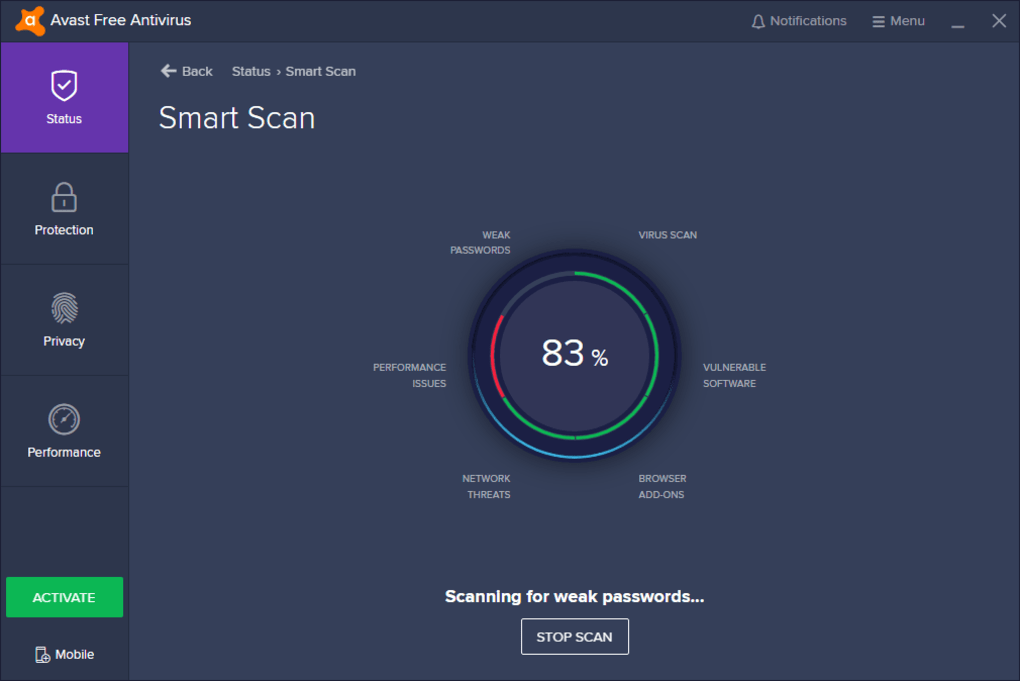
When you download Avast Antivirus to your computer, you get a virus scanner with some additional features. Available for free, the program searches for malware, spyware, and viruses by scanning your computer, network, and internet browsers.
It can also help users detect malicious add-ons, outdated software, weak passwords, and more.
It Comes with a User-Friendly Interface:
The Avast Free Antivirus download comes with a clean and simple interface. The program's main window displays a scan button which, once clicked, searches for all threats and displays the scan result. With the help of the right-hand panel, you can check the status of your computer's privacy, protection, and performance.
At the top of the program window, you will find only two icons — one for notifications and one for the menu. You can click on either to easily customize the program according to your preferences. This section also allows you to turn off certain features as well. Overall, the tool offers a beginner-friendly interface.
Is Avast Free a Good Antivirus?
Avast Free Antivirus is one of the few antivirus tools that provides enhanced security without putting a price on its services. The free program offers real-time protection that keeps checking downloaded files, emails, P2P transfers, instant messages, and internet browsing.
Once installed, the free antivirus can also scan and detect malicious browser extensions.
It Scans Your Network:
Apart from scanning your entire computer to provide robust protection, Avast Free Antivirus also scans your home or WiFi network.
Once launched, the tool searches the network to identify vulnerabilities that could result in the loss of your private data or sensitive information.
It also scans emails, messages, and files arriving through the network to protect your computer from threats and cyberattacks.
Blocks Pop-Up Windows
One of the best features available in Avast Free Antivirus is called Do Not Disturb mode, or DND. When this function is activated,
all pop-up windows will be suppressed whenever you are using an application in full-screen mode. This way, you can easily play video games or watch movies without interruption. You can use this feature to stop pop-up notifications for all software updates and virus alerts.
Offers Real-Time Scanning
With the help of real-time scanning, you can rest assured that Avast Free Antivirus will keep working even when you are not.
This is because it comes with a behavior scanner that tracks all programs and tools to detect any behavioral changes.
These may be warning signs that alert the free antivirus to attempts by a virus to manipulate or modify computer applications.
Does Avast Remove Viruses?
Yes, the free antivirus program is capable of detecting and removing all viruses it finds on your computer.
Moreover, the company that designed the tool states that the program will not only detect and delete malware,
but will also prevent it from infecting your system again. It also provides real-time threat protection by scanning your network, files, and browsers for any threats.
How Long Does Avast Free Antivirus Last?
The free anti-malware tool does not come with an annual subscription model that you may need to pay for after a year. Instead,
the program makes all its core features available for free to its users. However, it does offer some premium plans that come with advanced security measures as well as additional features. The premium plans are very reasonably priced and last for one year before asking you to pay for updates.
Are There Alternatives?
While Avast is one of the best free antivirus programs available on the market,
it does have features that users may find limited. Therefore, if you want to check out alternatives, you should explore McAfee Total Protection, Norton 360, and Kaspersky Antivirus.
Should I Download Avast Free Antivirus?
If you are looking for a simple, easy-to-use free antivirus tool,
you should download Avast Free Antivirus. As the name suggests,
the program is free to use and comes with a range of features that help detect and remove viruses, spyware, ransomware, and malware. It also maintains a continuous scan of the applications installed on your computer to highlight any new or harmful behavior.
Additionally, the program can also scan your network to detect any threats and identify vulnerabilities.
The latter can be anything from weak passwords to default settings. Once threats are detected and removed, Avast prevents them from infecting your computer
To Download the Program:

Or
And with that, my friend, we have successfully completed the mission 
With greetings from the #Ezznology team
Find what interests you at #our store
To subscribe to our newsletter on Google News, click here 

Or scan the code

You May Also Like: