

What is Cross-Site Scripting?
A cross-site scripting attack tricks a web browser into running malicious code.
What is Cross-Site Scripting?
Cross-site scripting (XSS) is an exploit where an attacker attaches code onto a legitimate website that will execute when a victim loads the website. This malicious code can be introduced in several ways. Most commonly, it is either added to the end of a url or posted directly on a page that displays user-generated content. Technically, cross-site scripting is a client-side code injection attack.
What is Client-Side Code?
Client-side code is JavaScript code that runs on a user's machine.
In the context of websites, client-side code is typically code that is executed by a web browser after the browser loads a web page.
This is in contrast to server-side code, which is executed on the host's web server. Client-side code is very useful with interactive web pages; interactive content works faster and more reliably because the user's computer does not need to communicate with a web server every time there is an interaction.
Browser-based games are one popular platform for client-side code,
where client-side code can ensure that the game runs smoothly regardless of connection issues.
Code that manages the client side is very common in modern web development and is used in most modern websites. Because cross-site code is a core component of the modern web,
cross-site scripting has become one of the most frequently reported cybersecurity vulnerabilities,
and XSS attacks have hit major sites such as YouTube, Facebook, and Twitter.
What is an Example of Cross-Site Scripting?
A commonly useful example of XSS attacks is on websites that have unvalidated comment forums. In this case, an attacker would post a comment consisting of executable code wrapped in <script></script> tags. These tags tell the web browser to interpret everything between them as JavaScript code.
Once this comment is on the page, when any other user loads this website,
the malicious code between the script tags will be executed by their web browser, and they will become a victim of the attack.
Also:
How Can an Attacker Use Cross-Site Scripting to Cause Harm?
XSS attacks via JavaScript are common because JavaScript has access to
some sensitive data that can be used for identity theft and other malicious purposes.
For example, JavaScript has access to cookies*, and an attacker can use an XSS attack to steal a user's cookies and impersonate them online. JavaScript can also make HTTP requests, which can be used to send data (such as stolen cookies) to the attacker.
Additionally, client-side JavaScript can help an attacker access APIs that contain geolocation coordinates, webcam data, and other sensitive information.
Also:
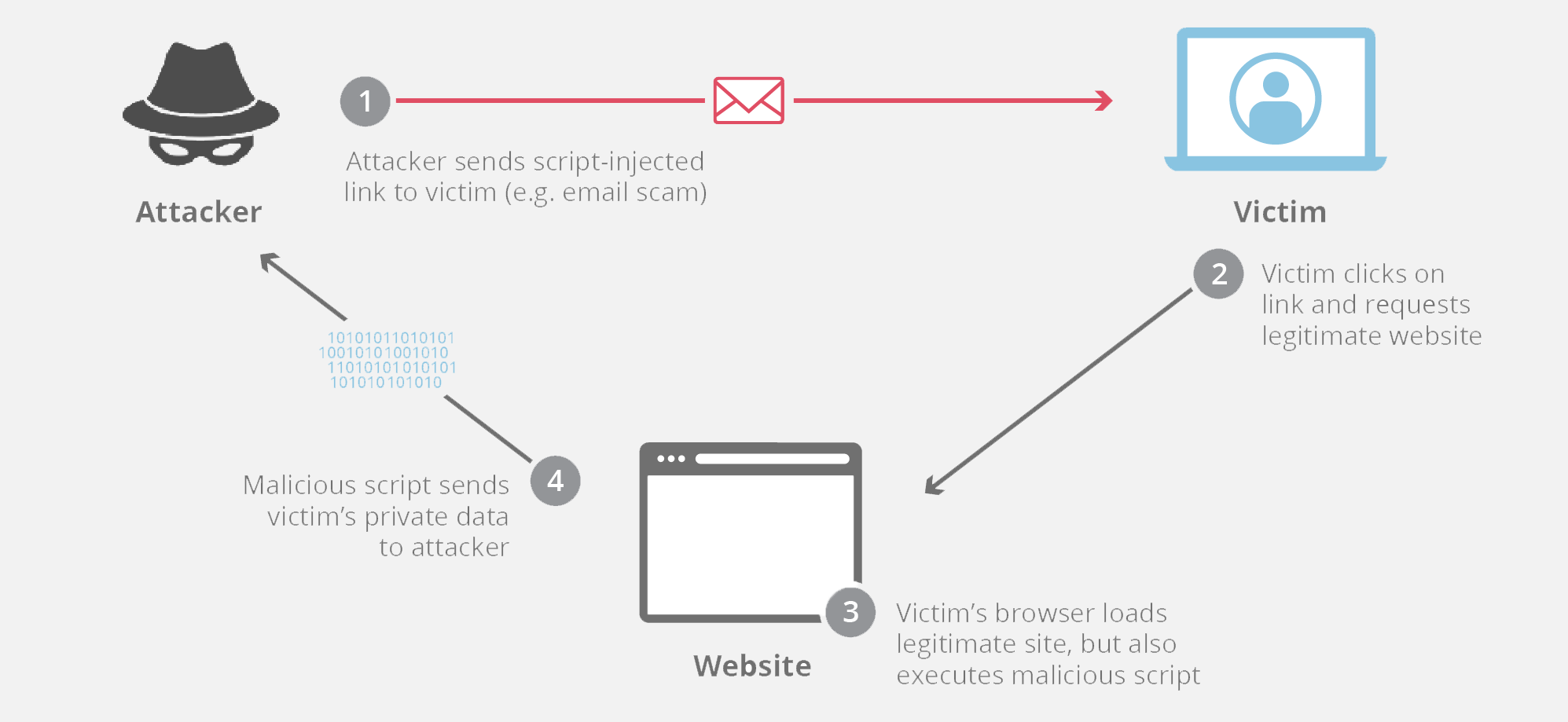
The flow of an XSS attack is as follows:
- The victim loads a web page and the malicious code copies the user's cookies
- The code then sends an HTTP request to the attacker's web server with the stolen cookies in the request body.
- The attacker can then use these cookies to impersonate the user on that website for the purpose of a social engineering attack or even to access bank account numbers or other sensitive data.
* Cookies are temporary login credentials saved on a user's computer.
For example,
when a user logs into a site like Facebook, the site gives them a cookie so that if they close the browser window and return to Facebook later that day,
they will be automatically authenticated by the cookie and won't need to log in again.
Also:
What are the Different Types of Cross-Site Scripting?
The two most common types of XSS attacks are reflected cross-site scripting and persistent cross-site scripting.
Reflected Cross-Site Scripting
This is the most common cross-site scripting attack. In a reflected attack, the malicious code is added to the end of a website's url; often this is a legitimate and trusted website. When the victim loads this link in their web browser, the browser will execute the code injected in the url. The attacker usually uses some form of social engineering to trick the victim into clicking the link.
For example, a user might receive an email that appears legitimate claiming to be from their bank. The email will ask them to take some action on the bank's online website, providing a link. The link might ultimately look something like this:
http://legitamite-bank.com/index.php?user=<script>here is some bad code!</script>Although the first part of the url looks safe and contains the domain of a trusted website, the code injected at the end of the url can be malicious.
Persistent Cross-Site Scripting
This occurs on websites that allow users to post content that other users see, such as a comment forum or a social media site, for example. If the site does not properly validate the input of user-generated content, an attacker can insert code that other users' browsers will execute when loading the page. For example, an attacker might go to an online dating site and put something like this in their profile:
"Hi! My name is Dave, I enjoy long walks on the beach and <script>malicious code here</script>"Any user who tries to access Dave's profile will become a victim of Dave's persistent cross-site scripting attack.
How to Prevent Cross-Site Scripting
There is no single strategy to mitigate cross-site scripting across sites, and different types of web applications require different levels of protection.
A number of preventive measures can be taken; below we outline a few of them.
Avoid HTML in inputs if possible — One very effective way to avoid persistent cross-site scripting attacks is to prevent users from posting HTML in form inputs.
There are other options that allow users to create rich content without using HTML, such as markdown and WYSIWYG editors.
Input validation — Validation means implementing rules that prevent a user from posting data in a form that doesn't meet certain criteria.
For example, an input asking for the user's "last name" should have validation rules that only allow the user to submit data consisting of alphanumeric characters.
Validation rules can also be set to reject any tags or characters commonly used in XSS, such as <script> tags.
Data sanitization — Data sanitization is similar to validation, but occurs after the data has already been posted to the web server, yet still before it is displayed to another user. There are many online tools that can sanitize HTML and filter out any malicious code injection.
Cookie security measures — Web applications can also put special rules for handling their own cookies that can mitigate cookie theft via XSS attacks. Cookies can be tied to specific IP addresses so that XSS attackers cannot access them. Additionally, rules can be established to prevent JavaScript from accessing cookies entirely.
Setting WAF rules — A WAF can also be configured to enforce rules that will prevent reflected XSS. These WAF rules use strategies that will block unusual requests to the server, including XSS attacks.
And that concludes our topic, dear friend — mission accomplished! 
With regards from the #Ezznology team
Find what you need at #our store
To subscribe to our newsletter on Google News, click here👇👇

or scan the code