What is TLS (Transport Layer Security)?
TLS is a security protocol that provides privacy and data integrity for Internet communications. Implementing TLS is standard practice for building secure web applications.
What Is Transport Layer Security (TLS)?
Transport Layer Security, or TLS, is a widely adopted security protocol designed to facilitate privacy and data security for communications over the Internet. The primary use case of TLS is encrypting the communication between web applications and servers, such as web browsers loading a website. TLS can also be used to encrypt other communications such as email, messaging, and voice over IP (VoIP). In this article we will focus on the role of TLS in web application security.
TLS was proposed by the Internet Engineering Task Force (IETF), an international standards organization, and the first version of the protocol was published in 1999. The most recent version is TLS 1.3, which was published in 2018.
What Is the Difference Between TLS and SSL?
TLS evolved from a previous encryption protocol called Secure Sockets Layer (SSL), which was developed by Netscape. TLS version 1.0 actually began development as SSL version 3.1, but the name of the protocol was changed before publication to indicate that it was no longer associated with Netscape. Because of this history, the terms TLS and SSL are sometimes used interchangeably.
What Is the Difference Between TLS and HTTPS?
HTTPS is an implementation of TLS encryption on top of the HTTP protocol, which all websites use, as well as some other web services. Therefore, any website that uses HTTPS is employing TLS encryption.
Why Should Businesses and Web Applications Use TLS?
TLS encryption can help protect web applications from data breaches and other attacks. Today, HTTPS secured by TLS is standard practice for websites. Google Chrome has gradually taken increasingly strict measures against websites that do not use HTTPS, and other browsers have followed suit. Internet users are becoming more cautious every day about websites that do not have the HTTPS padlock icon.
What Does TLS Do?
There are three main components to what the TLS protocol accomplishes: encryption, authentication, and integrity.
- Encryption: Hides the data being transferred from third parties.
- Authentication: Ensures that the parties exchanging information are who they claim to be.
- Integrity: Verifies that the data has not been forged or tampered with.
How Does TLS Work?
In order for a website or application to use TLS, it must have a TLS certificate installed on its origin server (the certificate is also known as an ”SSL certificate” due to the naming confusion explained above). A TLS certificate is issued by a certificate authority to the person or business that owns a domain. The certificate contains important information about who owns the domain, along with the server’s public key, both of which are important for verifying the server’s identity.
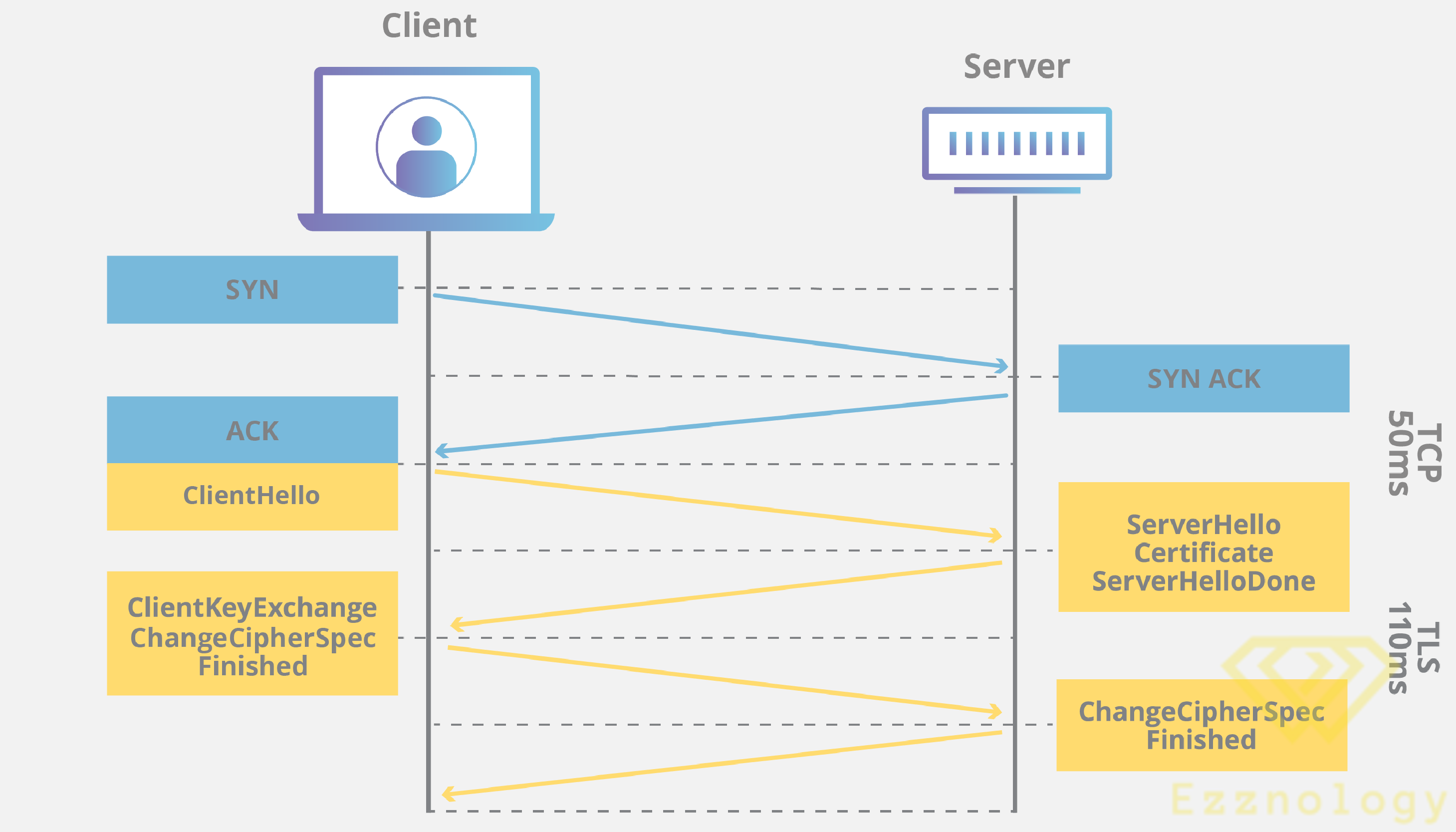
A TLS connection is initiated using a sequence known as the TLS handshake. When a user navigates to a website that uses TLS, the TLS handshake begins between the user’s device (also known as the client device) and the web server.
During the TLS handshake, the user’s device and the web server:
- Specify which version of TLS (TLS 1.0, 1.2, 1.3, etc.) they will use
- Decide which cipher suites (see below) they will use
- Authenticate the identity of the server using the server’s TLS certificate
- Generate session keys for encrypting messages between them after the handshake is complete
The TLS handshake establishes a cipher suite for each communication session. The cipher suite is a set of algorithms that specifies details such as which shared encryption keys, or session keys, will be used for that particular session. TLS is able to set matching session keys over an unencrypted channel thanks to a technology known as public key cryptography.
Also:
The handshake also handles authentication, which typically consists of the server proving its identity to the client. This is done using public keys. Public keys are encryption keys that use one-way encryption, meaning that anyone with the public key can decrypt the data encrypted with the server’s private key to ensure its authenticity, but only the original sender can encrypt data with the private key. The server’s public key is part of its TLS certificate.
Once data is encrypted and authenticated, it is signed with a message authentication code (MAC). The recipient can then verify the MAC to ensure the integrity of the data. This is similar to the tamper-evident seal on a bottle of aspirin. The consumer knows that no one has tampered with their medication because the seal is intact when purchased.
How Does TLS Affect Web Application Performance?
The latest versions of TLS barely affect web application performance at all.
Because of the complex process involved in setting up a TLS connection, some loading time and computational power must be spent. The client and server must communicate multiple times before any data is sent, and this uses up precious milliseconds of load time for web applications, plus some memory for both client and server.
Also:
However, there are technologies in place that help mitigate the potential latency added by the TLS handshake. One is TLS False Start, which allows the server and client to start transmitting data before the TLS handshake is complete. Another technique for speeding up TLS is TLS Session Resumption, which allows clients and servers that have previously communicated to use an abbreviated handshake.
These improvements have helped make TLS a very fast protocol that should not noticeably affect load times. As for the computational costs associated with TLS, they are mostly negligible by today’s standards.
TLS 1.3, released in 2018, made TLS even faster. The TLS handshake in TLS 1.3 requires one round trip (or round-trip communication) instead of two, cutting the process down by a few fractions of a second. When a user has connected to a website before, the TLS handshake has zero round trips, speeding it up even further.
And that’s it, friend – we have successfully completed the mission 
With regards from the #Ezznology team
Find what you need at #our store
To subscribe to our newsletter on Google News, click here 

Or scan the code

You might also be interested in:
What is IaaS (Infrastructure as a Service)?
New Malware Destroying Windows Devices | ESET
What is SaaS? | SaaS Definition