A Treasure in Every Sense – A Tool to Translate Anything Anywhere in Any Language to Arabic: Ejoy English
While enrolling in educational courses for self-development, growth, and lifelong learning, this will be one of the best things you can do for yourself in any field
However, you may face some difficulties, such as certain paid and premium courses that allow you to obtain an accredited certificate upon completion
And we here at Ezznology help you get past this, as we provide you with paid courses with accredited certificates at a 100% discount — truly amazing
With that, we have overcome the first hurdle together, God willing, and here is this free course at 100% off, which is dedicated to Office 365
The second challenge you may face if you are an Arabic speaker (native language) is that not all of us have a sufficient level of proficiency in other languages such as English, and the strange and complex thing about it too,
is that most, if not all, of the premium courses or programs are in languages other than Arabic — what a challenge, Ejoy English
Here too we have found a solution for this problem: by using the tool we are presenting to you today, any language will be like Arabic to you, and you can convert many, many languages into Arabic,
as if you were a native speaker of that language, with great ease and simplicity,
We have just passed through the second year of Covid-19, 2021 – a long year of disruptions and delays. Nevertheless, eJOY believes that these turbulences provide precious opportunities to spend some time for ourselves: time for self-reflection, time to learn many useful skills and knowledge. With that in mind, we invite you to listen to eJOY's development journey over the past year – small successes and inspiring stories from our learners.
An Inspiring Story: Ejoy English
Learning is a lifelong journey, and it never ends when we graduate from schools or universities. The President of Lac Hong University, Dr. Lam Thanh Hien, and his story of learning English with the eJOY app will give us a new perspective on the lifelong learning journey, and eJOY has chosen this story to be the inspiring story of this year.
On a daily basis, he tends to set a daily goal of studying English to accomplish 6,000 points on the eJOY app, attempting to spend 15 minutes in the morning to earn 2,000 points, with the remaining points divided evenly for afternoon and end-of-day study. He therefore always ensures that he will interact with English several times a day.
That is all – teachers, who always assume there is no need to develop regular English – are still persevering in trying every day to improve their knowledge. We hope that Dr. Lam Thanh Hien's story will inspire you toward a spirit of lifelong learning, not only in English but also in other knowledge or skills.
Some Numbers to Mark the End of 2021
By the end of 2021, eJOY's total learners exceeded one million. Nearly 400,000 of us use eJOY every week as a tool to help us immerse ourselves in the English world.
Every day, thousands of learners study joyfully to keep their learning streaks alive. 200 of us exceed streaks of 3 months, meaning there are 200 learners who have been learning English on eJOY for more than 90 days consecutively. And the rock star is the person who has learned on eJOY for 1,057 consecutive days – nearly 3 years without a day off.
Important Updates in 2021
eJOY English App
At the beginning of 2021, we laid out a plan to revamp the app, but the update required us to change the entire core engine, which took us longer than planned to launch the new app as promised. We are truly sorry for this delay and are working hard to achieve this in Q1 of 2022. Please continue reading for more information about this.
Despite the delay, we still made many updates to the app as follows:
- Offline Dictionary: Look up words while watching a video and keep learning even without an internet connection.
- Auto Captions: Watching video in landscape mode enables the auto-caption feature (the yellow sentence above the screen).
- Picture in Picture: Continue watching a video on a small screen even when switching to another screen.
GlotDojo App – Multilingual Learning App
GlotDojo is an app that helps you learn 19 different languages from your favorite videos with those specific features such as translating video subtitles, watching with bilingual subtitles, looking up words, saving words quickly, and reviewing with the well-known spaced repetition algorithm. Moreover, this app syncs with the GlotDojo extension. !!!
PDF Translator
Catering to the needs of everyday PDF users, the PDF Translator helps users look up and translate words in PDFs with one click on your laptop. Here are some key features, as examples and not limited to:
- Look up words and translate paragraphs in PDFs with one click.
- Listen to PDFs using a voice reader when you are “too lazy” to read.
- Translate a word with the click of a button.
At the end of 2021, we launched two new English learning tools, the Video Translator and Phonetics Transcription.
Video Translator – Translate and Edit Video Subtitles
This tool is for uploading your video with subtitles and editing the subtitles if needed. If you already have some video files, why not try it out and practice listening, dictation, and self-editing of subtitles all at once? Ejoy English
Phonetics Transcription
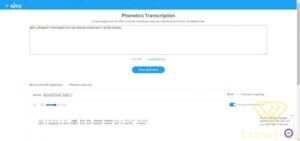
If you have a text and want to practice speaking it fluently, it is best to try Phonetics Transcription. All you need to do is copy and paste your text into the box, press Enter, and there you go. You can see the phonetics for the text in IPA format or respelling phonetics format.
If you are at an intermediate level and there are some words that challenge you, try turning off “Show all phonetic texts” now and click on the difficult words. We hope this tool helps you practice speaking with great ease.
Glotdojo Extension – Capture Look Up Feature
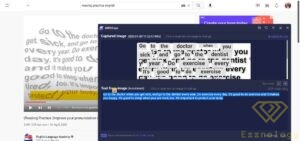
Many people have trouble using the Glotdojo extension to look up words when the accompanying subtitles are embedded in videos. The Capture Look Up feature will solve this problem. No need to switch tabs to check the dictionary; simply enable the Capture Look Up feature to capture the text area you want to check, and you will get the translations. You can save the captured image and its OCR text to your word list so you can review it at any time.
This feature does cost a small amount to obtain a translation API from Google. That is why it is still under our beta release and is available to Glot Premium Add-on subscribers (Chinese and Japanese dictionary add-ons). Ejoy English
In this video you will find the complete method for downloading the tool and how to use it to translate any video or readable content
Best of luck to everyone
You might also be interested in:
The Comprehensive Arabic Websites Directory
Our Services
The Concept of Cybersecurity and the Standards for Properly Applying It in Companies and Institutions to Avoid Cyberattacks