
Fixing Face ID Issues on iPhone | Ways to Solve the Face ID Problem on iPhone

Face ID on iPhone makes it easy to unlock your phone, authorize app downloads, make purchases, and more. But if this feature is sometimes unavailable or stops working, use the following methods to find out the cause of the failure and fix the problem. You can try these solutions on all iPhone models equipped with Face ID, starting from iPhone X.
1- Check for New OS Updates:
If you are experiencing any issues with Face ID on your iPhone, first make sure it is updated to the latest version of iOS. This is because Apple typically fixes bugs and potential issues on iPhones through iOS updates.
Therefore, if Face ID is not working or has failed to unlock your device several times, the problem may be that the operating system has not been updated. To fix this issue, update your iPhone's operating system to the latest available version.
2- Check Face ID Settings:
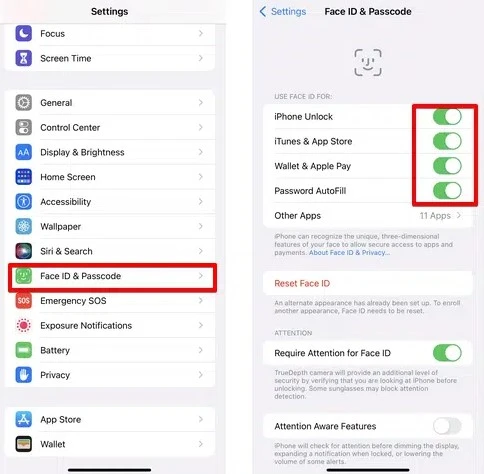
If you have updated your device and are still experiencing a Face ID failure, please check the feature settings on your device and follow the steps below:
Go to Settings.
Tap the Face ID & Passcode option.
If you see the option to Reset Face ID, that means you have already set up Face ID before. Otherwise, follow the prompts to set it up.
Make sure all the options shown on the Face ID settings page are enabled, such as iPhone Unlock, iTunes, App Store, Passcode Autofill, Wallet, and Apple Pay.
3- Clean the Face ID Sensor:
If your iPhone's Face ID is not working at all, it may be due to dust accumulation on the Face ID sensor. To fix this, try cleaning the sensor by wiping the top of the screen with a soft, dry cloth.
If you are using a thick screen protector, remove it as it may be slightly covering the Face ID sensor.
4- Make Sure Your Face Is Not Covered:
Depending on your iPhone model, Face ID may not work if you cover part of your face or head. To ensure this feature works smoothly, please make sure no part of your face is obscured. If you must cover your face or head, the only option currently available to you may be to enter the passcode manually.
5- Hold the Phone Correctly:
On iPhones running iOS 15 or earlier, Face ID only works when you hold the phone vertically. If Face ID does not work when you tilt your phone, try holding it upright and make sure you are holding it properly and at a slight distance from your face.
6- Restart iPhone:
One of the basic and effective methods for fixing some problems with electronic devices is to turn the device off for a few minutes and then turn it back on. If you have tried one of the previous methods to fix the Face ID feature on your iPhone and it did not work, please try restarting your iPhone, then enter your passcode. Then try using Face ID again.
7- Set an Alternate Appearance for Face ID:
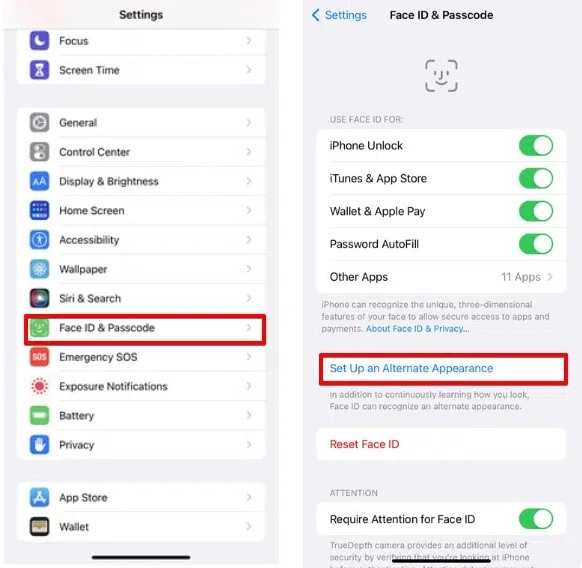
You can set alternate appearances to help Face ID recognize you when wearing glasses or when you change your appearance in some way. Here is how to do it:
Go to Settings.
Tap the Face ID & Passcode option. Then enter your passcode.
Set up an alternate appearance and follow the on-screen instructions. Set Up an Alternate Appearance
Finally
8- Reset Face ID:
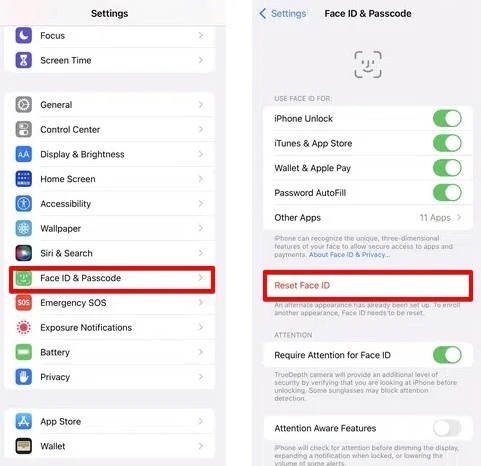
If you have tried all the methods mentioned above and they still do not work, please reset the Face ID function and set it up again. To do this, you can follow the steps below:
Go to Settings.
Tap the Face ID & Passcode option.
Tap the Reset Face ID option.
Restart the phone.
After it powers on, go to Settings again, then select Face ID and Passcode and follow the steps to set up a new Face ID.
Fixing Face ID Issues on iPhone
And with that, my friend, we have successfully completed the mission 
With regards from the #Ezznology team
Find what you need at #our store
To subscribe to our newsletter on Google News, click here 👇👇

Or scan the QR code

You may also be interested in:
You.Com Search Engine — Google's Fierce Rival Powered by Artificial Intelligence
How to Recover Deleted WhatsApp Messages Even Without a Backup #whatsapp
200 Million Email Addresses of Twitter Users Leaked Online #TwitterDisaster