
What Is DNS? | How Does DNS Work?
What Is DNS?
The Domain Name System (DNS) is the phone book of the Internet. Humans access information online through domain names, such as nytimes.com or espn.com. Web browsers interact through Internet Protocol (IP) addresses. DNS translates domain names into IP addresses so that browsers can load Internet resources.
Every device connected to the Internet has a unique IP address that other devices use to find it. DNS servers eliminate the need for humans to memorize IP addresses such as 192.168.1.1 (in IPv4), or more complex alphanumeric IP addresses such as 2400:cb00:2048:1::c629:d7a2 (in IPv6).

what is the dns
How Does DNS Work?
The DNS resolution process involves converting a hostname (such as www.example.com) into a computer-friendly IP address (such as 192.168.1.1). An IP address is assigned to each device on the Internet, and this address is necessary to find the appropriate Internet device – much like using a street address to find a specific house. When a user wants to load a webpage, a translation must occur between what the user types into their web browser (example.com) and the machine-friendly address needed to locate the example.com webpage.
To understand the process behind DNS resolution, it is important to know about the different hardware components a DNS query must pass through. For the web browser, DNS lookup happens “behind the scenes” and requires no interaction from the user’s computer beyond the initial request.
There Are 4 DNS Servers Involved in Loading a Webpage:
- DNS Recursor – The recursor can be thought of as a librarian who is asked to go find a particular book somewhere in a library. The DNS recursor is a server designed to receive queries from client machines through applications such as web browsers. The recursor is then typically responsible for making additional requests in order to satisfy the client’s DNS query.
- Root Name Server – The root server is the first step in translating (resolving) human-readable hostnames into IP addresses. It can be thought of as an index in a library that points to different shelves of books – typically it serves as a reference to other more specific locations.
- TLD Name Server – The top level domain (TLD) server can be thought of as a specific shelf of books in a library. This name server is the next step in the search for a specific IP address, and it hosts the last portion of a hostname (in example.com, the TLD server is “com”).
- Authoritative Name Server – This final name server can be thought of as a dictionary on a shelf of books, in which a specific name can be translated into its definition. The authoritative name server is the last stop in a name server query. If the authoritative name server has access to the requested record, it will return the IP address for the requested hostname back to the DNS recursor (the librarian) that made the initial request.
What Is the Difference Between an Authoritative DNS Server and a Recursive DNS Resolver?
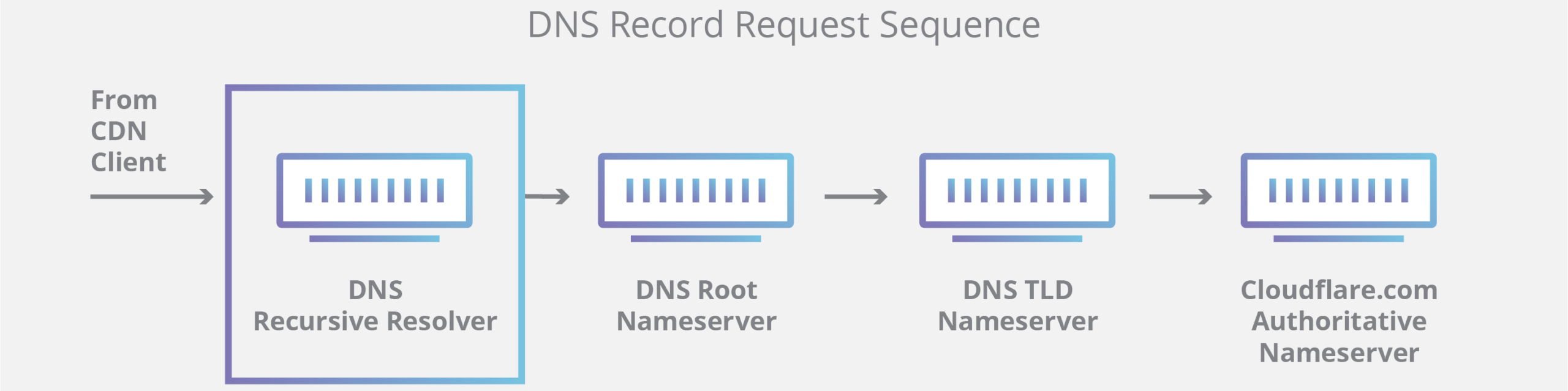
Both concepts refer to servers (groups of servers) that are integral to the DNS infrastructure, but each performs a different role and lives in different locations inside the DNS query pipeline. One way to think about the difference is that the recursive resolver is at the beginning of the DNS query and the authoritative name server is at the end.
Recursive DNS Resolver
The recursive resolver is the computer that responds to a recursive request from a client and takes the time to track down the DNS record. It does this by making a series of requests until it reaches the authoritative DNS name server for the requested record (or times out or returns an error if no record is found). Fortunately, recursive DNS resolvers do not always need to make multiple requests in order to track down the records needed to respond to a client; caching is a data persistence process that helps shorten the necessary requests by serving the requested resource record earlier in the DNS lookup.
Authoritative DNS Server
Simply put, an authoritative DNS server is a server that actually holds and is responsible for DNS resource records. This is the server at the bottom of the DNS lookup chain that will respond with the queried resource record, ultimately allowing the web browser to make the request to access the IP address needed to reach a website or other web resources. An authoritative name server can satisfy queries from its own data without needing to query another source, as it is the final source of truth for certain DNS records.
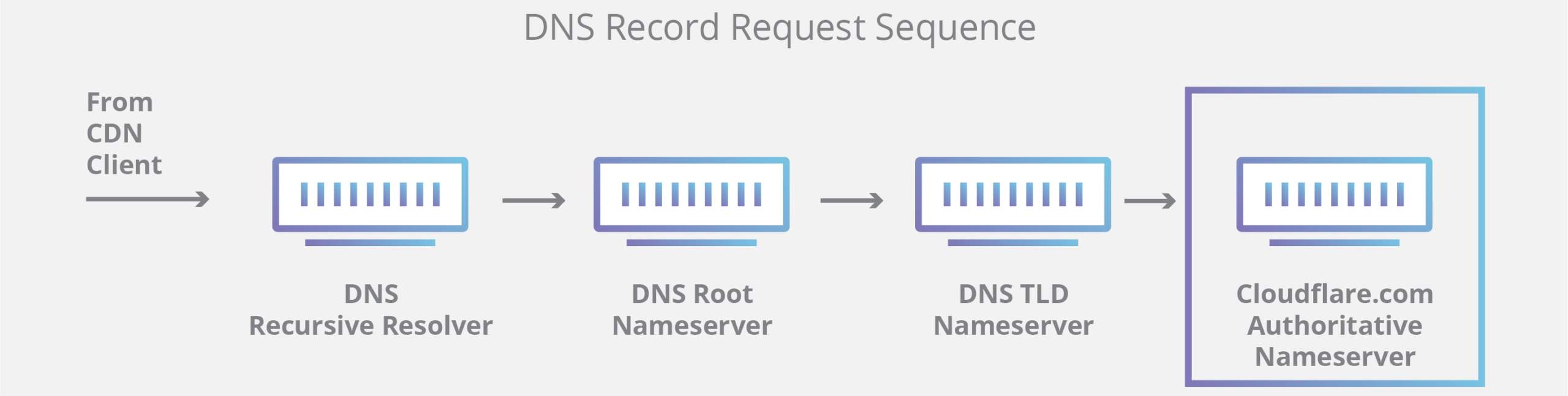
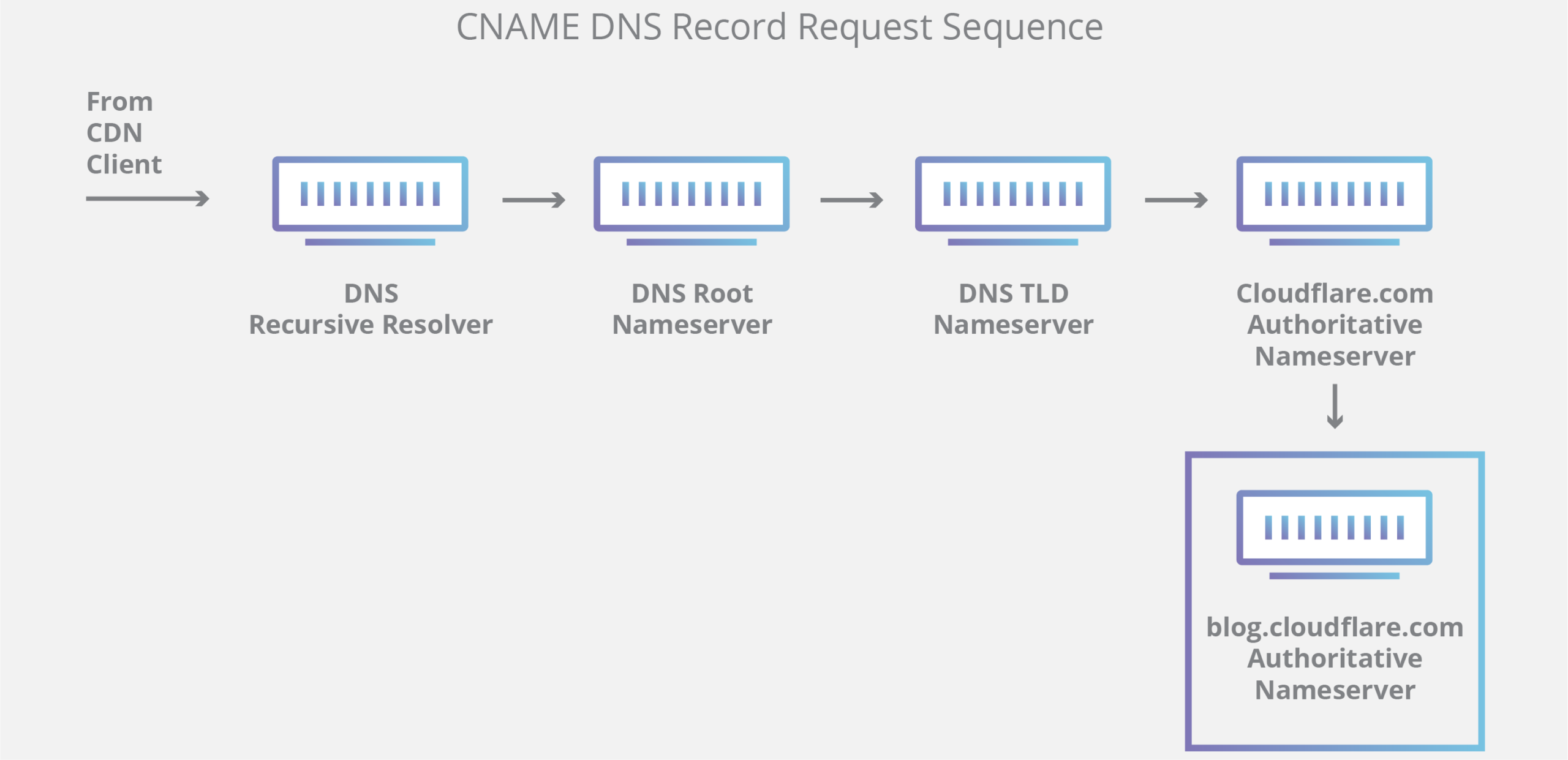
It is worth noting that in cases where the query is for a subdomain such as foo.example.com or store.ezznology.com, an additional name server will be added to the sequence after the authoritative name server, which is responsible for storing the CNAME record for the subdomain.
There is a key difference between many DNS services and the services they provide. Different recursive DNS resolvers such as Google DNS, OpenDNS, and service providers such as Comcast maintain data center installations of recursive DNS resolvers. These resolvers allow for quick and easy queries through optimized clusters of DNS-optimized computer systems, but they are fundamentally different from the name servers they host.
Infrastructure-level name servers are maintained that are an integral part of the operation of the Internet. One key example is the f-root server network, for which hosting is partially responsible. F-root is one of the components of the root-level DNS name server infrastructure responsible for billions of Internet requests daily. The Anycast network puts it in a unique position to handle large amounts of DNS traffic without service interruption.
What Are the Steps in a DNS Lookup?
In most cases, DNS is concerned with translating a domain name into the appropriate IP address. To understand how this process works, it helps to follow the path of a DNS lookup as it travels from a web browser, through the DNS lookup process, and back again. Let’s take a look at the steps.
Note: DNS lookup information is often cached either locally within the querying computer or remotely in the DNS infrastructure. There are typically 8 steps in a DNS lookup. When DNS information is cached, steps are skipped from the DNS lookup process making it faster. The example below outlines all 8 steps when nothing is cached.
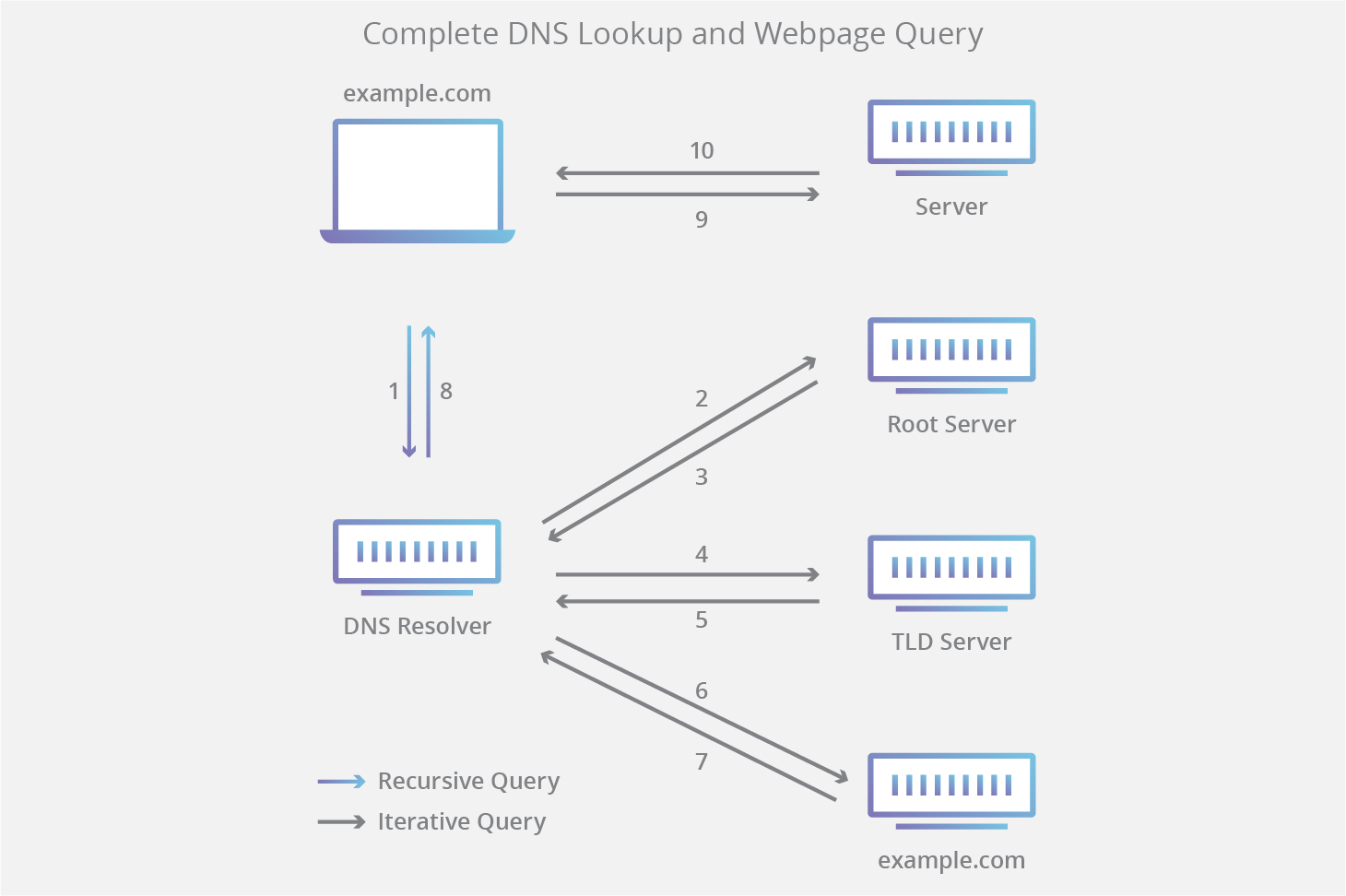
The 8 Steps in a DNS Lookup:
-
- A user types “example.com” into a web browser and the query travels over the Internet and is received by a DNS recursive resolver.
- The resolver then queries a DNS root name server (.).
- The root server then responds to the resolver with the address of a top level domain (TLD) DNS server (such as .com or .net), which stores the information for its domains. When searching for example.com, our request is directed toward the .com TLD.
- The resolver then makes a request to the .com TLD.
- The TLD server then responds with the IP address of the domain’s name server, example.com.
- Finally, the recursive resolver sends a query to the domain’s name server.
- The IP address for example.com is then returned to the resolver from the name server.
- The DNS resolver then responds to the web browser with the IP address of the domain initially requested.
Once the 8 steps of the DNS lookup have returned the IP address for example.com, the browser is able to make a request for the webpage:
- The browser makes an HTTP request to the IP address.
- The server at that IP address returns the webpage to be rendered in the browser (step 10).
What Is a DNS Resolver?
A DNS resolver is the first stop in the DNS lookup, and it is responsible for dealing with the client that made the initial request. The resolver initiates the sequence of queries that ultimately leads to a URL being translated into the necessary IP address.
Note: A typical uncached DNS lookup will involve both recursive and iterative queries.
It is important to distinguish between a recursive DNS query and a recursive DNS resolver. The query refers to the request made to a DNS resolver requiring the resolution of the query. A recursive DNS resolver is the computer that accepts a recursive query and processes the response by making the necessary requests.

What Are the Types of DNS Queries?
In a typical DNS lookup, three types of queries occur. Using a combination of these queries, the optimized process of DNS resolution can result in a reduction of travel distance. In an ideal situation, cached record data will be available, allowing the DNS name server to return a non-recursive query.
3 Types of These Queries:
- Recursive Query – In a recursive query, a DNS client requires that the DNS server (typically a recursive DNS resolver) respond to the client either with the requested resource record or with an error message if the resolver cannot find the record.
- Iterative Query – In this case, the DNS client will allow the DNS server to return the best answer it can. If the queried DNS server does not have a match for the query name, it will return a referral to the authoritative DNS server for a lower level of the domain name space. The DNS client will then make a query to the referral address. This process continues with additional DNS servers down the query chain until either an error occurs or a timeout is reached.
- Non-Recursive Query – This will typically occur when a DNS resolver client queries a DNS server for a record that it has access to, either because it is authoritative for the record or because the record exists within its cache. A DNS server will typically cache DNS records to prevent additional bandwidth consumption and load on primary servers.
What Is DNS Caching? Where Does DNS Caching Occur?
The purpose of caching is to temporarily store data in a location that results in performance and reliability improvements for data requests. DNS caching involves storing data closer to the requesting client so that the DNS query can be resolved earlier and additional queries further down the DNS lookup chain can be avoided, thereby improving load times and reducing bandwidth/CPU consumption. DNS data can be cached in a variety of locations, each of which will store DNS records for a set amount of time determined by the time-to-live (TTL).
Browser DNS Caching
Modern web browsers are designed by default to cache DNS records for a set period of time. The purpose here is obvious. The closer DNS caching is to the web browser, the fewer processing steps need to be taken in order to check the cache and make the correct requests to an IP address. When a request is made for a DNS record, the browser cache is the first location checked for the requested record.
In Chrome, you can see the status of the DNS cache by navigating to chrome://net-internals/#dns.
Operating System (OS) Level DNS Caching
The OS-level DNS resolver is the second and final local stop before a DNS query leaves your device. The process within your operating system that is designed to handle this query is commonly called a “stub resolver” or DNS client. When the stub resolver receives a request from an application, it first checks its own cache to see if it has the record. If it does not, it then sends a DNS query (with a recursive flag set), outside the local network to a DNS recursive resolver inside the Internet Service Provider (ISP).
When the recursive resolver inside the ISP receives a DNS query, like all previous steps, it will also check to see if the requested host-to-IP-address translation is already stored within its own local persistence layer.
The recursive resolver also has additional functionality depending on the types of records in its cache:
- If the resolver does not have A records but does have NS records for the authoritative name servers, it will query those name servers directly, bypassing several steps in the DNS query. This shortcut prevents lookups from the root name servers and .com (in our example.com search) and helps resolve the DNS query more quickly.
- If the resolver does not have NS records, it will send a query to the TLD servers (.com in our case), skipping the root server.
- In the unlikely event that the resolver does not have records pointing to TLD servers, it will then query the root servers. This event typically occurs after a DNS cache flush.


Read More:
How Does Cloud Security Work? | Cloud Computing Security
What Is Cloud Migration? | Cloud Migration Strategy | Cloud Transfer
What Is the Public Cloud? | Public Cloud vs. Private Cloud | Cloud Computing