A Complex Password Is Your First Line of Defense Against Hacks and Hacker Attacks
First, let us be clear that no one is completely safe online,
and you have likely heard in recent days, and continue to hear,
about phishing attacks and breaches of major corporations and banks, as well as cyberattacks around the world,
and in many organizations regardless of their size or power.
The question here is: after confirming that we are vulnerable to being breached at any time and to phishing attacks,
as long as we are connected to the internet,
which connects the entire world as if we were all in one place,
how do I protect myself, my family, and my community from these attacks?
This is a very important question, and every adult who uses the internet should ask themselves this, whether they connect via a phone, tablet, desktop computer,
or any other device that has a SIM card and is connected to an IP address — and to learn what an IP address is, you can definitely check out this article,
to understand what an IP address is, what it is used for, and how to find your own IP address.
Your First Line of Defense Against Hackers Is Your Password:
Of course, it is not a complete shield, but it is the most important step and the foundational layer in protecting yourself online and securing your accounts from being hacked.
This brings us to the core of the topic: what are passwords made of, and does their strength vary
depending on their components, and what should I include in my passwords?
Let me tell you that the best thing you can definitely do when creating your password
is to make it strong and complex, containing letters, symbols, and numbers,
with a combined total of at least 12 characters, according to the recommendations of cybersecurity experts and global companies in this field.
The more complex the password, the harder it will be for hackers and intruders to guess it
using the algorithms and machines that humanity has developed.
The best practice to this day that adds strength to passwords is
that it should be a passphrase rather than just isolated characters — for example,
For Example
(I like swimming), which is much harder to guess and crack compared to another password like (123456),
which bots only need a few milliseconds to figure out.
That is why there are some websites that provide a report on your password and how strong it is,
as well as how long it would take machines and bots to crack it,
and after applying the tips we mentioned, the result could reach thousands of years,
or even millions of years for those bots to figure out your password,
and this is our goal — to make the task of reaching your password virtually impossible,
an impenetrable fortress that is nearly impossible to break down, making it very difficult to reach you.
One of the most well-known websites for this purpose is Security,
which you can visit to test the strength of your password and how long it would take to crack it from here
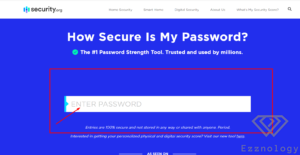
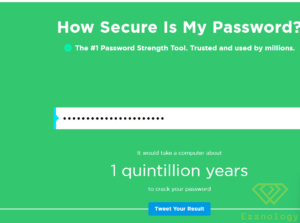
After that you will type your password into the box as shown in the image,
After typing your password or the one you are testing to check its strength,
the website will give you a report on that password, its strength, and how long it would take hackers to crack it,
as shown in the image
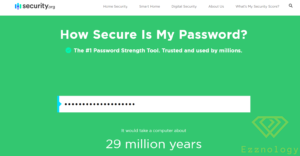
It is truly delightful when you see that the password you use for your accounts
would take machines and bots 29 million years to crack,
can you imagine that number, my friend?
There are even more complex passwords that would take far longer than that, and I will leave you to try that for yourself,
because the matter of protecting your data and your family is worth it.
The Security.org Website
Security.org reviews the latest technologies, products, and services available to secure both our digital and physical lives.
We cut through the chaos and confusion to provide actionable advice and recommendations.
The Security.org research team focuses on issues related to home safety, digital safety, and identity theft.
The meaning of being safe has expanded far beyond just home security,
to include protecting our personal and financial data and our digital footprint.
We study the issues facing modern society and partner with research organizations and institutions
to broaden their understanding and awareness of digital safety.
Security.org adds the “How Secure Is My Password” tool to the website,
as part of Cybersecurity Awareness Month as well
The most commonly used password of 2020, for example, can be cracked by a computer in less than a second
October Is Cybersecurity Awareness Month:
which aims to help people be safer and more secure online,
said Tyler Stamble, Chief Strategy Officer at Centerfield Media,
which owns Security.org: “This year alone, Americans have reported more than 200,000
COVID-19-related online scams to the Federal Trade Commission, for example,
“. “Having a strong password is one of the simplest and best ways to reduce the likelihood of becoming a victim of cybercrime,
and we are excited to have this tool as part of Security.org.”
Security.org also released today its annual report on the passwords Americans use.
Forty-five percent of Americans also have passwords consisting of eight characters or fewer.
Americans also use personal or thematic words as part of their passwords.
14% of Americans used “COVID” as part of their passwords,
and 16% use their pet’s name while another 16% use their birth year.
The most commonly used password, “123456”, will be cracked by a computer in one second.
A strong password like “3d87*^lneiFuiek?” would take a computer 41 trillion years.
View the full study findings at https://www.security.org/resources/online-password-strategies/ .
Read Also:
Warning About Investing in Cloud Mining — Between Fraud, Theft, and Platform Hacks: Shamining.com
Exclusive: Elon Musk Wants to Cut Tesla’s Workforce by 10%
Download the Popular Meetings App Zoom Meetings 5.7.7.1105 for Windows
How to Set a Default Operating System on macOS (Mac OS)
Avast Secure Browser for Windows — A Fast, Free, and Easy-to-Use Private Browser