What Is My IP Address? And Why Does It Matter?
What Is an IP Address and Why Is It Important?
The term “IP” stands for Internet Protocol, which is the set of rules that allows devices to communicate over the Internet. With billions of people accessing the Internet every day, unique identifiers are essential for tracking who is doing what. The Internet Protocol solves this problem by assigning IP numbers to every device that connects to the Internet.
ddos-dns
A computer’s IP address is like a physical home address. If someone calls a pizza restaurant to place a delivery order, they must provide their physical address. Without that address, the pizza delivery person would have no idea which house to deliver the pizza to!
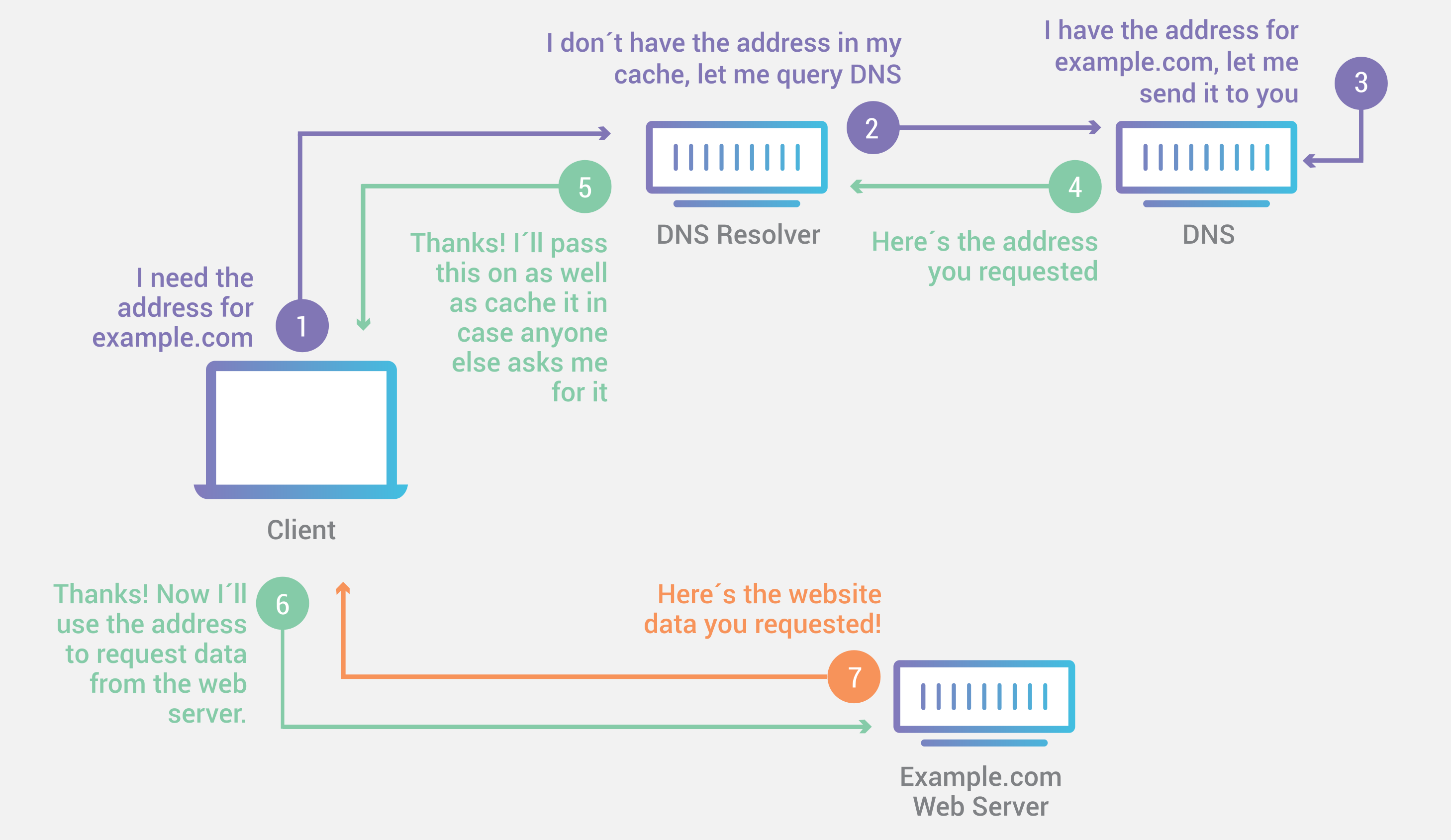
For example, when a user types a domain name, such as google.com, into a web browser, that initiates a request to Google’s web server asking for content (the Google homepage). Once Google receives the request, it needs to know where to send the website content. For this reason, the request will contain the requester’s IP address. Using the provided IP address, Google can send a response to the user’s device, which will then display the content in the user’s web browser.
The system that manages all of this is called DNS. It works like a phone book for IP addresses so that users can access web services using human-friendly domain names. When a user types a domain name such as “facebook.com” into a browser window, this initiates a DNS query that ultimately reaches a DNS server which translates the domain name into an IP address.
What do IP addresses look like? These addresses have different formats depending on whether they are IPv4 or IPv6.
What Is the Difference Between IPv4 and IPv6?
IPv4 and IPv6 are different versions of the Internet Protocol. IPv4 was implemented in 1983 and is still in use today. The IPv4 address format consists of four groups of numbers separated by dots, for example: “74.125.224.72”. This is a 32-bit format, meaning it allows for 232, or approximately 4.3 billion, unique IP addresses, which turned out to be insufficient for the number of devices now on the Internet. The need for more IP addresses led to the implementation of IPv6. * IPv6 addresses use a more complex format that uses groups of numbers and letters separated by single or double colons, for example: “2607:f860:4005:804::200e”. This 128-bit format can support 2128 unique addresses. (That works out to a 39-digit number!)
IPv6 provides several other updates to IPv4, including security and privacy improvements. Despite the differences between them, both IPv4 and IPv6 have been used simultaneously on the web for nearly a decade. The two versions can run in parallel, but special measures must be implemented to facilitate communications between IPv4 and IPv6 devices. This compromise was necessary because much of the web still runs on IPv4 addresses.
* What happened to IPv5? IPv5 was an experimental streaming data protocol that was never implemented. It used the same 32-bit format as IPv4, so it did not adequately solve the problem of not having enough unique IP addresses. For this reason, IPv6 became the successor to IPv4.
What Is the Difference Between Static and Dynamic IP Addresses?
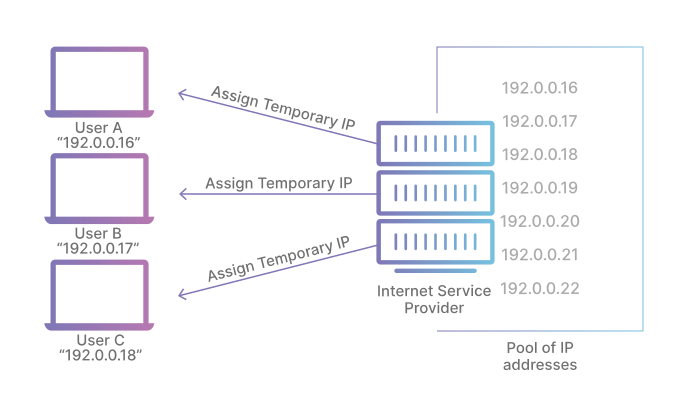
The limited supply of IPv4 addresses led to the introduction of dynamically assigned IP addresses, which remains a very common practice. Temporary IP addresses are assigned to most devices that connect to the Internet.
For example, when a home user connects to the Internet on their laptop, their Internet Service Provider (ISP) assigns them a temporary IP address from a shared pool of IP addresses. This is known as a dynamic IP address. This is more cost-effective for the ISP than assigning a static or fixed IP address to every user.
Some ISP customers, such as large enterprises, will pay to retain a static IP address (for example, 1.1.1.1). However, for most users, having a dynamic IP address is sufficient. When hosting a web server, such as a self-hosted website, an API, or a game server, a dynamic IP address can cause problems. Changing the IP address can cause their DNS queries to fail, effectively making the resource unreachable. Fortunately, this problem can easily be corrected using dynamic DNS.