When you send a message to an address like [email protected], your mail server doesn't automatically know where to deliver it. First it has to ask the Domain Name System (DNS): "Who receives mail for this domain?" The answer lives in a small record called the MX record, which directs email to a mail exchange server. Understanding it can save you hours if your company's email suddenly stops or you move to a new email provider.
What is a DNS MX record?
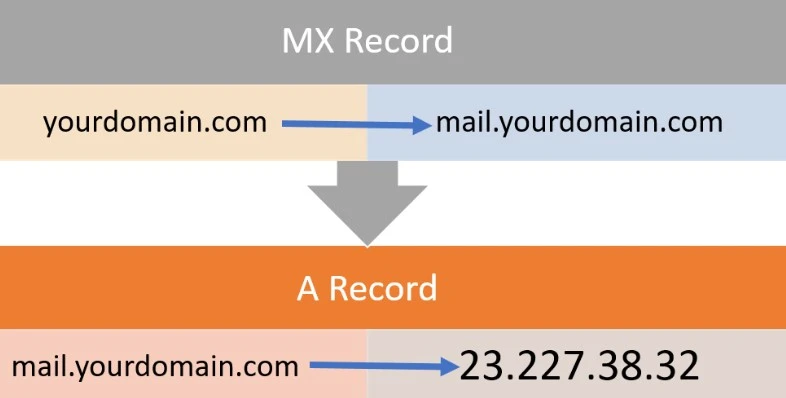
A DNS "mail exchange" (MX) record directs email to a mail server. It indicates how email messages should be routed in line with the Simple Mail Transfer Protocol (SMTP), the standard protocol for email. Like CNAME records, an MX record must always point to another domain name, not directly to an IP address.
A practical MX record example
| example.com | Record type | Priority | Value | TTL |
|---|---|---|---|---|
| @ | MX | 10 | mailhost1.example.com | 45000 |
| @ | MX | 20 | mailhost2.example.com | 45000 |
The "priority" numbers before the domains indicate preference: the lower value is preferred. The sending server will always try mailhost1 first because 10 is lower than 20. If delivery fails, it falls back to mailhost2.
What the fields mean
- @: shorthand for the domain itself, example.com.
- Priority: the order in which servers are tried; lowest first.
- Value: the name of the mail server that receives messages.
- TTL: how many seconds servers cache the record before asking again.
Load balancing with equal priority
An email service can also configure MX records so both servers have equal priority and receive an equal share of mail:
| example.com | Record type | Priority | Value | TTL |
|---|---|---|---|---|
| @ | MX | 10 | mailhost1.example.com | 45000 |
| @ | MX | 10 | mailhost2.example.com | 45000 |
This setup lets the provider balance load evenly between the two servers.
How does an MX lookup work?
The message transfer agent (MTA) software is responsible for querying MX records. When a user sends an email, the MTA sends a DNS query to identify the recipient's mail servers. It then opens an SMTP connection to those servers, starting with the highest-priority one (mailhost1 in the first example).
Put simply: you write the message, your server asks DNS for the recipient domain's MX record, gets a server name, looks up that name's IP address, and delivers the message, all in a fraction of a second.
What is a backup MX record?
A backup MX record is simply an MX record for a mail server with a higher "priority" number, meaning lower preference, so that under normal conditions mail goes to the preferred servers. In the first example, mailhost2 is the backup, because mailhost1 handles the traffic as long as it is up.
Can MX records point to a CNAME?
A CNAME record points an alias to a domain's canonical name, and usually leads to an A record (IPv4) or AAAA record (IPv6). MX records, however, must point directly to a server name with an A or AAAA record. Pointing to a CNAME is prohibited by the RFCs that define how MX records work, including RFC 2181.
Why MX matters to site and business owners
Picture a small company in Kuwait or Cairo that moves its website to a new host, then finds two days later that customer emails have stopped arriving. Often the DNS was migrated without the correct MX records, so mail is heading to a server that no longer accepts it. Make reviewing MX records a fixed step in any domain or hosting move, save a copy of the current records first, and copy a cloud provider's values exactly as given.
How to check your domain's MX records
- Windows: open Command Prompt and type nslookup -type=mx example.com.
- macOS and Linux: use dig example.com MX.
- Control panel: open the DNS settings at your registrar or host and review the MX entries.
Common MX mistakes
- Leaving the old provider's records next to the new ones after a migration, splitting mail between them.
- Entering an IP address instead of a server name.
- Forgetting that changes aren't visible until the old TTL expires.
- Ignoring SPF, DKIM and DMARC, TXT records that help keep your mail out of spam folders.
FAQ
How long does an MX change take?
It depends on the previous TTL; anywhere from minutes to hours while servers refresh their caches.
Can a domain have more than one MX record?
Yes. It's common, for a backup server or load balancing, as in the examples above.
What happens if a domain has no MX record?
Under the SMTP standard, servers may try delivering to the domain's own A record, but relying on that is not recommended; set a clear MX record instead.
The MX record is small, but it decides the fate of every message sent to your domain. Review it whenever you switch email providers, check the priorities and values, and you'll avoid most lost-mail problems.